

Product feed management is the work of collecting your product data, cleaning it, reshaping it to each channel’s rules and keeping it current. For a brand selling in Europe, that means one feed per marketplace and country, with local language, local identifiers and local compliance fields. It is also where most listings quietly fail. We built our marketplace management service so that brands do not have to run this alone: our onboarding covers data mapping and error resolution, and the same team keeps optimizing the listings afterward.
This guide explains what a feed is, how the process works, what to check before a feed goes live, and what changes when the destination is a European marketplace rather than a single ad channel.
TL;DR
- A product feed is a structured file with one row per product: ID, title, description, price, availability, image, link and category, plus attributes such as size and color.
- Feed management means collecting, standardizing, optimizing, validating, delivering and monitoring that data on a schedule, not exporting a file once.
- Missing or wrong identifiers (GTIN/EAN), weak titles and data that conflicts with your product page are the most common reasons products get rejected or lose visibility.
- Europe adds a layer: separate feeds per marketplace and country, translated copy, local categories and EU compliance information.
- The routine only works if someone owns it every week. Our onboarding handles data mapping and error resolution, and our team keeps optimizing afterward.
Table of Contents
- What a product feed is and what it contains
- What product feed management actually involves
- The attributes that decide whether you get approved and found
- A feed routine, step by step
- Monitoring: how to know your feed is healthy
- What changes when you sell across European marketplaces
- Where we come in
- Our perspective
- FAQ
- Sources
What a product feed is and what it contains
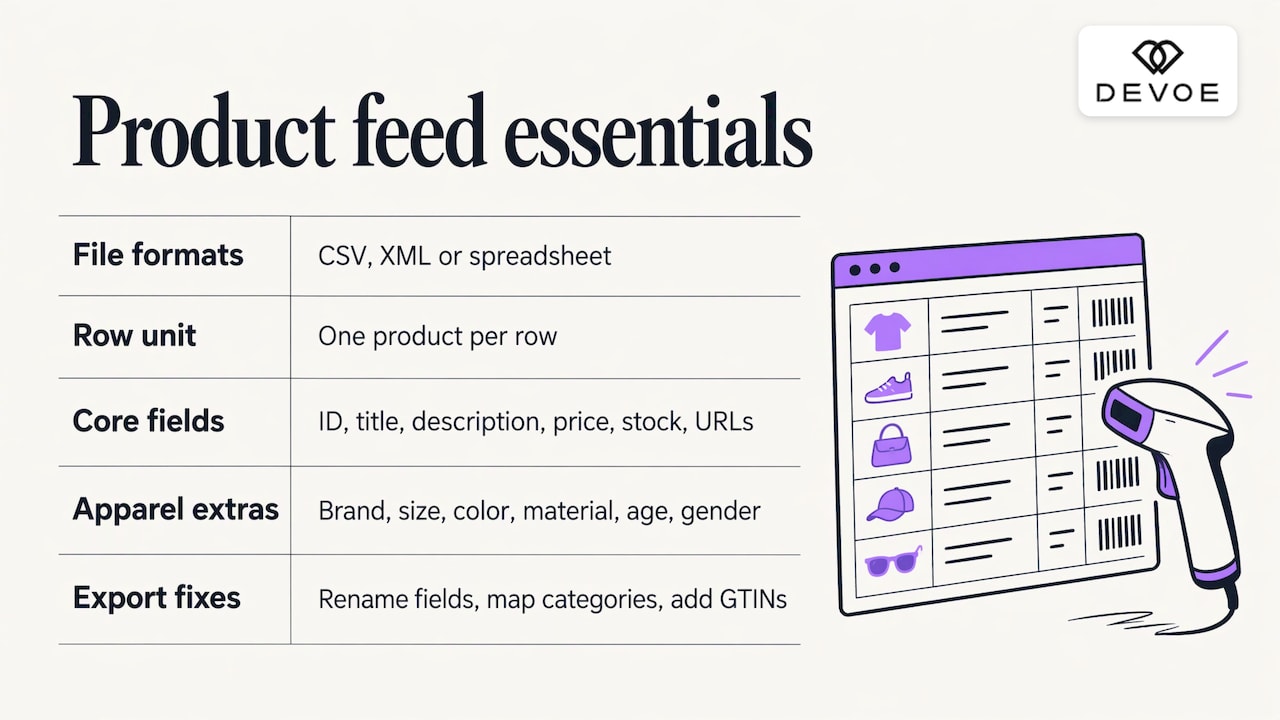
A product feed is a structured file, usually CSV, XML or a spreadsheet, that lists your catalog so a channel can read it. Each row is a product. The core columns are an ID, title, description, price, stock availability, product URL, image URLs and category. Apparel feeds typically add brand, size, color, material, age group, gender and condition (Mulwi).
The channel reads this file to decide whether your product is eligible, which searches it can appear for and what shoppers see. Google’s own documentation says inaccurate or missing product information can lead to disapprovals, limited eligibility or display problems (Google Merchant Center Help). The file is not a formality. It is the listing.
Your store export is rarely a usable feed. It typically needs fields renamed, prices written with an ISO currency code, internal categories mapped to the channel’s taxonomy, titles restructured for search and GTINs added, since most store exports do not contain them (Koongo).
What product feed management actually involves
Managing a feed is a loop, not a task. The stages, in order:
- Collect. Pull the catalog, variants, prices and inventory from your store, ERP or product information system into one clean master record.
- Standardize. Normalize sizes, colors and units so “Navy”, “navy blue” and “NVY” are one value.
- Optimize and map. Adjust titles, descriptions and categories for each channel and map your attributes to its required fields.
- Validate. Check required fields, formats and identifiers before anything is submitted.
- Deliver. Send the file by upload, scheduled fetch or API.
- Monitor. Read rejections and diagnostics, fix root causes and feed what you learn into the next cycle.
This sequence matches how the industry describes the pipeline: ingest, standardize, optimize, validate, syndicate, monitor (GoDataFeed). A good rule from the same guidance: keep your master product facts stable and put channel-specific formatting in a separate layer, so changing a title for one marketplace never overwrites the truth at the source.
Why a spreadsheet stops working
Catalog size is not the usual trigger. Change speed is. Once prices, stock or assortment change faster than a person can re-export and re-check, the feed is already out of date (FeedArc). On a marketplace, a stale price or a phantom in-stock item turns into a cancelled order or a suppressed listing.
How often a feed should refresh depends on how fast the data moves. Price and stock on an active catalog may need hourly updates or faster, while descriptive attributes are often fine daily (GoDataFeed). Our guide to marketplace inventory management goes deeper on keeping stock accurate across channels.
The attributes that decide whether you get approved and found
Channels differ, but the same handful of fields cause most of the trouble.
Unique ID
Google’s specification asks for a unique ID of up to 50 characters, ideally your SKU, kept stable across updates (Google Merchant Center Help). Changing IDs resets a product’s history on the channel.
Title
Google allows titles of up to 150 characters, with no promotional text, and wants distinguishing features such as color or size included (Google Merchant Center Help). Other channels set their own limits, so a title written once rarely fits everywhere. Titles are also the first thing to localize. See marketplace SEO for how titles and attributes drive ranking on European marketplaces.
GTIN
A GTIN is the barcode number that identifies a product globally. In North America it is a 12-digit UPC, in Europe a 13-digit EAN. Google requires a GTIN when the manufacturer assigned one, warns that products submitted without one may have limited visibility and says an incorrect GTIN causes disapproval (Google Merchant Center Help). For a US brand entering Europe, this matters in practice: the EAN on your European packaging has to match what you register. bol, for example, requires each item delivered to its fulfillment center to carry a visible EAN that matches how it was registered (bol partner platform).
Images, price and availability
Google checks your website and may disapprove products when the feed does not match the page, so price and availability in the feed must agree with the landing page, and feeds should be updated when the site is (Google Merchant Center Help). Image rules vary by channel in size and background, so image requirements belong in your feed checklist. Our image optimization guide covers what European marketplaces expect.
Recommended attributes
Google’s advice is to submit all required attributes and as many recommended ones as possible, because relevant attributes can improve the chance of appearing for relevant searches (Google Merchant Center Help). Completeness is a visibility lever, not just a compliance box.
A feed routine, step by step
Here is the routine we would hand a brand, with what each step takes and where it tends to go wrong.
Step 1: Build a clean master catalog
Gather every product with a stable ID, GTIN, brand, MPN (manufacturer part number), price, stock, images and attributes in one place. Where it goes wrong: variants. A shirt in five sizes needs five rows with a shared parent, and missing variant attributes are a common cause of rejection.
In our onboarding, data mapping and error resolution are part of what we do, so the master record is built against each marketplace’s actual requirements rather than a generic template.
Step 2: Define your destinations
List every marketplace, country, language, currency, domain, stock source and the person responsible for each. This destination matrix keeps localized feeds from drifting apart (ChannelDock). Where it goes wrong: treating “Europe” as one market. Amazon Germany, bol in the Netherlands and Zalando each want different data. Our guide to cross-border ecommerce explains how these markets differ.
Step 3: Map and localize
Map your categories to each marketplace’s taxonomy and write local-language titles and descriptions. Translation here is product copy, not a literal word swap: size conventions, units and search terms differ by country. We handle content creation and translation as part of our service, and you can read more about ecommerce translation and product localization.
Step 4: Apply rules instead of manual edits
Rules keep this repeatable: filter out products that should not ship to a channel, map fields, transform values, compose titles from several attributes and set fallbacks for missing data (WISEPIM). Where it goes wrong: patching individual rows by hand. The fix disappears at the next refresh.
Step 5: Validate before you submit
Check required fields, formats, category assignment and completeness of recommended attributes, then spot check five to ten random products by hand (Merchkit). Missing required fields can get the whole feed rejected.
Step 6: Deliver on a schedule
Common methods are SFTP upload, a hosted URL the channel fetches, or an API for near-real-time changes to price and stock. One common recommendation is to update price and availability every 2 to 4 hours and the full catalog daily (Nventory). Treat that as a starting point and adjust to how fast your own data moves.
Step 7: Monitor and fix
This is the step brands underestimate. We cover it in the next section.
Monitoring: how to know your feed is healthy
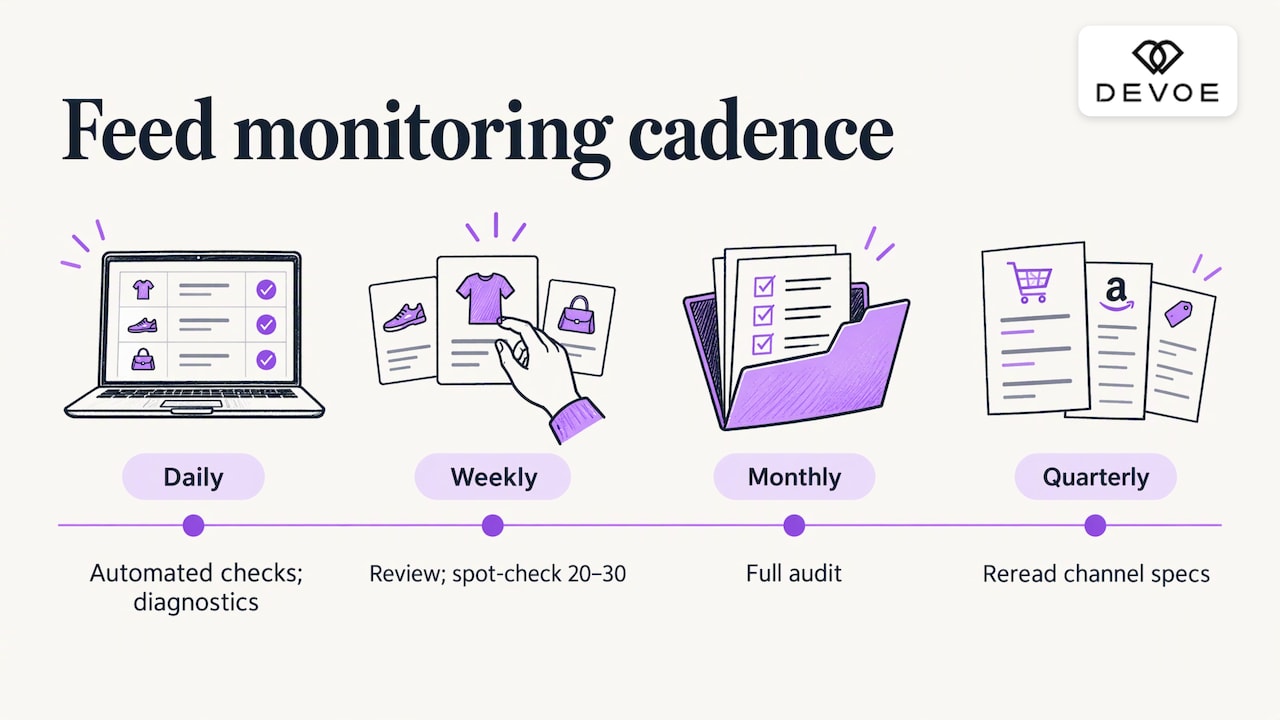
Track four things: coverage (how much of the catalog is live), approval rate, time to fix an error and how quickly you react when a channel changes its specification. Compare rows submitted, ingested and approved over time to catch silent drops (FeedArc).
A workable cadence from the same guidance: automated checks daily, a weekly review of rejections grouped by root cause, and a quarterly reread of each channel’s specifications. On Google, check Merchant Center diagnostics daily, spot check 20 to 30 live products weekly and run a full audit monthly (Keepers Digital). Set alerts for delivery failures, a disapproval rate above a threshold such as 5%, or no successful update in 24 hours, and keep at least seven days of feed history so you can roll back (Nventory).
One point changes how you read your numbers. Products that are rejected or suppressed never enter your conversion denominator, so a healthy-looking conversion rate can hide a catalog that is half invisible (GetCatalog). Check eligibility first, then judge performance. Our service includes performance reporting, so these numbers are reviewed alongside sales.
What changes when you sell across European marketplaces
A feed for an ad channel and a listing feed for a marketplace are different jobs. Marketplace listings are the store itself, so the data is stricter and the localization deeper.
| Area | What to prepare |
|---|---|
| Identifiers | EAN/GTIN for each variant, valid and matching the packaging |
| Language | Local-language titles, bullets and descriptions per country |
| Pricing | Local currency and VAT-inclusive consumer prices where the market expects them |
| Categories | Each marketplace’s own taxonomy, mapped per product |
| Fulfillment | Delivery times, shipping and returns data per country |
| Compliance | EU product safety and responsible-person information where required |
Published listing requirements from marketplaces such as bol and Zalando call for EAN/GTIN, and several marketplaces ask for EU product safety information under the General Product Safety Regulation (GPSR) for EU listings. Confirm the exact fields in each marketplace’s current seller documentation before you submit, since requirements change.
The practical method is to test with a small batch in one market, fix what the marketplace returns, then roll out country by country. Brands that try to launch the whole catalog in four countries at once typically spend the first month in a rejection queue. For the wider picture, see our guide on how to expand your ecommerce business internationally in Europe, and for what happens after the feed is accepted, product page optimization.
Where we come in
If your goal is to sell on European marketplaces, the feed is a means, not the project. We help brands with strategic matchmaking to the right marketplaces, onboarding with data mapping and error resolution, content creation and translation, ongoing optimization, targeted advertising, store visual branding, logistics setup and performance reporting. The marketplaces we work with include Amazon, bol, eBay, Zalando, About You, Modivo and Douglas.
If you already know where you want to sell, start with the page for that marketplace: Amazon, Zalando, bol, eBay or Douglas. If you are still deciding, our marketplace integration services page explains what the work covers.

Our perspective
Most feed problems we would expect a brand to hit are not technical. They are ownership problems. A feed has to be right the day it is built and still right three weeks later, when prices moved, a size sold out and a marketplace tightened a rule.
That is why we treat the feed as part of the whole expansion rather than a separate file. The data mapping, the localized content, the advertising and the reporting all depend on the same product record. When one team owns it end to end, a rejection becomes a fix to the source instead of a one-off patch.
Our approach is hands-on: matchmaking first, then onboarding, content and ongoing growth management. A brand that wants Europe as a real sales channel gets the most from having the feed, the listings and the performance reporting in one place.
tinkara
FAQ
What is product feed management?
It is the process of collecting product data, cleaning and optimizing it for each channel’s requirements, and delivering current feeds on a schedule. It covers both the file itself and the ongoing monitoring of errors and approvals.
What does a product feed contain?
One row per product with an ID, title, description, price, availability, image link, product URL and category. Depending on the product, it also carries brand, GTIN, size, color, material and other attributes.
How often should a product feed update?
It depends on how fast your data changes. Price and stock on an active catalog may need updates every few hours or faster, while descriptive content is often fine daily. Google also advises submitting data whenever you update your website.
Do I need a different feed for each European marketplace?
Yes, in practice. Each marketplace and country has its own category structure, required fields, language and currency. A master catalog feeds separate, localized versions for each destination.
Why do products get rejected from a feed?
The usual causes are missing or incorrect GTINs, missing variant attributes, low-quality images, wrong categories and price or availability that does not match the product page (Google Merchant Center Help).
Sources
- Product data specification, Google Merchant Center Help
- Provide high-quality data, Google Merchant Center Help
- Label your items, bol partner platform
- What is Product Data Feed Management, Mulwi
- The Complete Guide to Product Feed Management, Koongo
- Feed Management, Explained, GoDataFeed
- Product Feed Management: A Practical Playbook, FeedArc
- Localized Product Feeds, ChannelDock
- Product feed management: rules, channel specs and tools, WISEPIM
- Pre-Export Validation Checklist, Merchkit
- Product Feed Management: Complete Guide, Nventory
- Product Feed Optimization, Keepers Digital
- Digital shelf: the operating guide for product visibility, GetCatalog